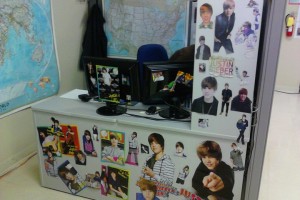
Most of what you see there comes from a single issue of a magazine aimed at the pre-teen girl crowd. There was just no end to the cutting – every page was either a full-page photo of him or had three pics of him up. Darren, the poor victim here, is actually hiding in his chair for this photo.
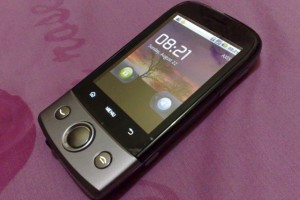
I bought a new phone on Monday. It’s the Android-powered Huawei U8100 offered by Wind Mobile, which is being sold for $160. I have to say, I’m pretty amazed what you can get for that much.
Let’s look at what this little device includes:
A CPU (500MHz) and some RAM (128MB). This is equivalent to what you would find in a desktop computer ten years ago. A whole computer – in the palm of your hands.
A GPS receiver. These used to cost hundreds of dollars and be bulky devices just a decade ago. Now this thing can provide turn-by-turn navigation with a pretty user interface.
Wifi connectivity. This phone can latch onto a wireless network, so you can surf without using up your data plan.
A bluetooth antenna. So this thing can communicate on three different levels: cellular, wifi, bluetooth. All in this little package.
Tri-axis accelerometers. You can literally take gravity readings of where you are. Or know exactly what orientation the device is in.
Tri-axis magnetometers. In layman’s terms: a built-in digital compass.
A camera. It takes still pictures and videos.
An FM radio. Why the heck not.
And of course, a GSM modem, speaker, microphone, touch screen, and the other usual trimmings you’d expect from a phone.
All of this is pretty standard for a phone like this. But imagine trying to describe this device to someone from the eighties. Or heck, even the nineties. Technology has advanced by absolute leaps and bounds. And this is a low-end smart phone.
If you’re shopping for a new phone, I don’t know whether I’d recommend this one off the bat. In my case, I was looking for the cheapest device that would provide a good mobile web surfing experience. This delivered. It does browsing well, albeit with the third-party Opera browser instead of the one that’s bundled. It does email well. It handles YouTube videos with ease. There’s an app store that has tons of free programs and games for you to download.
That said, the low-resolution of the screen (320×240) means that you won’t have access to all the software on the Android app store. It also runs the last generation (2.1) of the Android OS, with no plans to provide an upgrade to the latest 2.2 Froyo build. The touch screen keyboard with predictive text doesn’t hold a candle to a physical keyboard.
Anywho, this post wasn’t really meant to be a review of the phone, so much as a statement that I can’t believe how much we can cram into these little things today. A desktop computer. In the palm of your hand. Amazing.
What will cellphones look like in ten years from now?
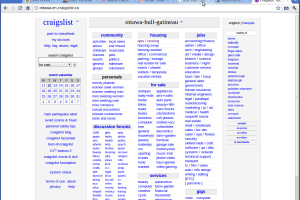
In our search for apartments, Jay and I have scoured the likes of Kijiji, Craigslist, and aggregates such as PadMapper. So far, three of the places to which we’ve enquired have turned out to be scams.
The story is always the same. The person is now out of the country, and has the only set of keys with them. As such you can view the outside of the apartment, not the inside. They’ll arrange to ship you the keys though, I assume in exchange for a large fee. Jay is busy playing with one of the scammers.
My initial email:
Hi there,
I saw your ad on Craigslist for the one bedroom condo on George street. We’re a young professional couple looking for a new home in downtown Ottawa, and we’re very much interested in your condo. When would it be available? Could we arrange a viewing?
Thank you, Julien McArdle
The reply:
Hello Julien,
I got your mail in regards to my apartment for rent and thanks for your interest/inquiry in renting my apartment. Firstly, I want you to know that I’m not given my apartment for rent just because of money reason alone but due to my transfer of work to west Africa. I’m an X-RAY WELDER UNDER SHIP BUILDING, I have been working with nasco ship building here in the country, but have just been transferred to Niger dock Nigeria PLC. I left country with hope that I will be coming back in a month’s time but right now the company have asked me to stay for 2yrs under contract with them, that’s why I have made up my mind to put up my apartment for rent, but I will like you to keep the apartment for me well okay just like yours, okay. I want to let you know that the apartment is available for rent anytime, you can easily go there and check it, but the issue is that you will not be able to check inside of the apartment, so through the address you will provide for me which I will use to send you the keys and the documents to you through DHL COURIER SERVICE and It will be home delivery. I appreciate your expression and the apartment include cable /internet access, furnished, Central Air Conditioning, Laundry, Garbage Chute, Pets OK, cleaning service, dry cleaning,Heating, Electricity,etc and everything is already been furnished. And here is the application form below that you must answer to qualify for the rent of my apartment and I want you to know that I’m giving this apartment for rent base on trust and due to the way I read your reply to my apartment, hope you have a nice working day, in fact I will like to meet you when coming to visit you soonest. Also, Please let me get this answer and you can call me on my cell +2347053085884 OR 0112347053085884
RENT APPLICATION FORM
1)Your Full Name
2)Your Full Address & Phone Number
3)How old are you?
4)Are you married?
5)How many people will be living in the house?
6)Do you have a pet?
7)Do you have a car?
8)Occupation?
9)How long Do you intend to stay?
Looking forward to hearing from you with all this details so that I can have it in my file in case of issuing the receipt for you and contacting you and pets is allowed. Awaiting your reply so that we can discuss on how to get the documents and the keys to you, please we are giving you all this base on trust.
I will be waiting to read back from you as soon as possible.
Thanks and God Bless you.
Regards, Wilfred
Another of the response was by an alleged woman in Manchester, and another yet in Cambridge, England. I responded to “Wilfred”, feigning interest. I’m curious to see if he’ll respond back.
Jay and I are on the hunt for a new apartment. We thought we had found the perfect place – downtown, 2 bedroom, reasonable price, and it included a washer/dryer!
Unfortunately though, the landlord favoured another couple. So off we go, keeping on looking. In other news, I handed in my 60 days notice to my current place.
I don’t really remember when it started. I want to say I was 15 or 16. In any case, at some point during that time the panic attacks began. Almost every night, I would be overcome with a sensation of great unpleasantness, great anxiety, which would progress to a debilitating point. Then, ever so suddenly, all those sensations would vanish.
These attacks only ever occurred during the nighttime, and only in the comfort of my own bed. If I was I visiting elsewhere, I would usually be okay. I found out quickly that turning on lights helped to hamper the panic attacks. There was always a trigger. A specific thought that would bring these on, that I was never able to fully ignore.
The panic attacks went on for years. Sometimes I would try to punch myself in the head when I felt them coming on, to try to knock myself out – and stop this altogether. Yet throughout all of this, I never wanted to see the doctor. To be honest, I can’t explain now why I was so against it. Maybe I had falsely convinced myself that I could overcome this on my own. Maybe I was embarrassed of being an adult incapable of behaving as such.
Things changed after I met Jay. He was always there to comfort me when I had the attacks, and he would continuously express his desire for me to talk to my doctor about it. Then it took a turn for the worse. The panic attack got to the level where I vomited in bed. Finally, I realized that I couldn’t go on like this. I went to see my doctor.
My physician recommended two things. One, he put me on Cipralex, which is a selective serotonin reuptake inhibitor. The other, he strongly suggested, was for me to see a specialized psychotherapist. I had told him about the trigger for the panic attacks, and he suggested that this type of therapist would be able help me address it directly.
I’ve since concluded my sessions with the therapist. Though he was helpful in other aspects of my life, I really was unable to address my trigger. He thought I might have Post-Traumatic Stress Disorder, but if that’s the case I don’t believe that to be the source of it. It exacerbates the situation, but it’s not the trigger.
What did help was Cipralex. It took months for it to kick in for me, but finally, for the first time since these panic attacks started, I’ve had a week of uninterrupted sleep. It’s such a wonderful thing, to be able to rest, to be able to dream once more.